LineCurve#
- class rateslib.curves.LineCurve(*args, **kwargs)#
Bases:
CurveCurve based on value parametrisation at given node dates with interpolation.
- Parameters:
nodes (dict[datetime: float]) – Parameters of the curve denoted by a node date and a corresponding value at that point.
interpolation (str in {"log_linear", "linear"} or callable) – The interpolation used in the non-spline section of the curve. That is the part of the curve between the first node in
nodesand the first knot int. If a callable, this allows a user-defined interpolation scheme, and this must have the signaturemethod(date, nodes), wheredateis the datetime whose DF will be returned andnodesis as above and is passed to the callable.t (list[datetime], optional) – The knot locations for the B-spline cubic interpolation section of the curve. If None all interpolation will be done by the method specified in
interpolation.c (list[float], optional) – The B-spline coefficients used to define the log-cubic spline. If not given, which is the expected case, uses
csolve()to calculate these automatically.endpoints (str or list, optional) – The left and right endpoint constraint for the spline solution. Valid values are in {“natural”, “not_a_knot”}. If a list, supply the left endpoint then the right endpoint.
id (str, optional, set by Default) – The unique identifier to distinguish between curves in a multi-curve framework.
convention (str, optional,) – This argument is not used by
LineCurve. It is included for signature consistency withCurve.modifier (str, optional) – This argument is not used by
LineCurve. It is included for signature consistency withCurve.calendar (calendar or str, optional) – This argument is not used by
LineCurve. It is included for signature consistency withCurve.ad (int in {0, 1, 2}, optional) – Sets the automatic differentiation order. Defines whether to convert node values to float,
DualorDual2. It is advised against using this setting directly. It is mainly used internally.
Notes
This curve type is value based and it is parametrised by a set of (date, value) pairs set as
nodes. The initial node date of the curve is defined to be today, and can take a general value. The initial value will be affected by aSolver.Note
This curve type can only ever be used for forecasting rates and projecting cashflow calculations. It cannot be used to discount cashflows becuase it is not DF based and there is no mathematical one-to-one conversion available to imply DFs.
Intermediate values are determined through
interpolation. If local interpolation is adopted a value for an arbitrary date is dependent only on its immediately neighbouring nodes via the interpolation routine. Available options are:“linear” (default for this curve type)
“log_linear” (useful for values that exponential, e.g. stock indexes or GDP)
“flat_forward”, (useful for replicating a DF based log-linear type curve)
“flat_backward”,
And also the following which are not recommended for this curve type:
“linear_index”
“linear_zero_rate”,
Global interpolation in the form of a cubic spline is also configurable with the parameters
t,candendpoints. See splines for instruction of knot sequence calibration. Values before the first knot intwill be determined through the local interpolation method.This curve type cannot return arbitrary tenor rates. It will only return a single value which is applicable to that date. It is recommended to review RFR and IBOR Indexing to ensure indexing is done in a way that is consistent with internal instrument configuration.
Examples
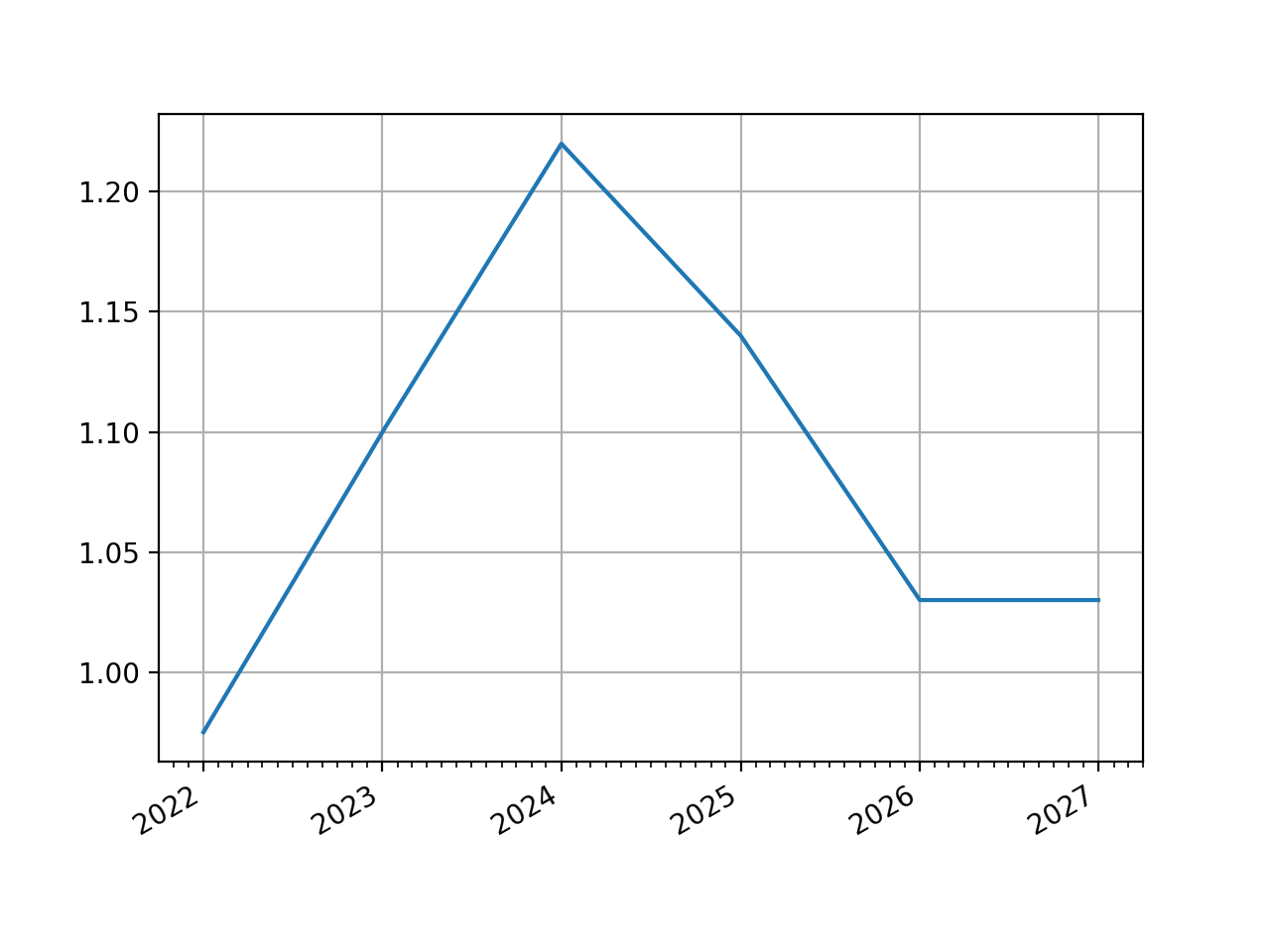
In [1]: line_curve = LineCurve(
   ...:     nodes={
   ...:         dt(2022,1,1): 0.975,  # <- initial value is general
   ...:         dt(2023,1,1): 1.10,
   ...:         dt(2024,1,1): 1.22,
   ...:         dt(2025,1,1): 1.14,
   ...:         dt(2026,1,1): 1.03,
   ...:         dt(2027,1,1): 1.03,
   ...:     },
   ...:     interpolation="linear",
   ...: )
   ...:

In [2]: line_curve.plot("1d")
Out[2]:
(<Figure size 640x480 with 1 Axes>,
 <Axes: >,
 [<matplotlib.lines.Line2D at 0x1139a39d0>])
(
Source code,png,hires.png,pdf)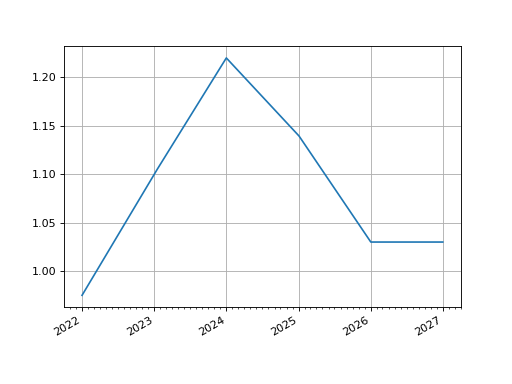
Attributes Summary
Methods Summary
copy()Create an identical copy of the curve object.
csolve()Solves and sets the coefficients,
c, of thePPSpline.from_json(curve, **kwargs)Reconstitute a curve from JSON.
index_value(date[, interpolation])Calculate the accrued value of the index from the
index_base.plot(tenor[, right, left, comparators, ...])Plot given forward tenor rates from the curve.
plot_index([right, left, comparators, ...])Plot given forward tenor rates from the curve.
rate(effective, *args, **kwargs)Return the curve value for a given date.
roll(tenor)Create a new curve with its shape translated in time
shift(spread[, id, composite, collateral])Raise or lower the curve in parallel by a set number of basis points.
to_json()Convert the parameters of the curve to JSON format.
translate(start[, t])Create a new curve with an initial node date moved forward keeping all else constant.
update([nodes, interpolation, endpoints])Update a curve with new, manually input values.
update_node(key, value)Update a single node value on the Curve.
Attributes Documentation
- ad#
- collateral = None#
Methods Documentation
- csolve()#
Solves and sets the coefficients,
c, of thePPSpline.- Return type:
None
Notes
Only impacts curves which have a knot sequence,
t, and aPPSpline. Only solves ifcnot given at curve initialisation.Uses the
spline_endpointsattribute on the class to determine the solving method.
- classmethod from_json(curve, **kwargs)#
Reconstitute a curve from JSON.
- index_value(date, interpolation='daily')#
Calculate the accrued value of the index from the
index_base.- Parameters:
date (datetime) – The date for which the index value will be returned.
interpolation (str in {"monthly", "daily"}) – The method for returning the index value. Monthly returns the index value for the start of the month and daily returns a value based on the interpolation between nodes (which is recommended “linear_index) for
InflationCurve.
- Return type:
Examples
The SWESTR rate, for reference value date 6th Sep 2021, was published as 2.375% and the RFR index for that date was 100.73350964. Below we calculate the value that was published for the RFR index on 7th Sep 2021 by the Riksbank.
In [3]: index_curve = Curve(
   ...:     nodes={
   ...:         dt(2021, 9, 6): 1.0,
   ...:         dt(2021, 9, 7): 1 / (1 + 2.375/36000)
   ...:     },
   ...:     index_base=100.73350964,
   ...:     convention="Act360",
   ...: )
   ...:

In [4]: index_curve.rate(dt(2021, 9, 6), "1d")
Out[4]: 2.3750000000015703

In [5]: index_curve.index_value(dt(2021, 9, 7))
Out[5]: 100.7401552534832
- plot(tenor, right=NoInput.blank, left=NoInput.blank, comparators=NoInput.blank, difference=False, labels=NoInput.blank)#
Plot given forward tenor rates from the curve. See notes.
- Parameters:
tenor (str) – The tenor of the forward rates to plot, e.g. “1D”, “3M”.
right (datetime or str, optional) – The right bound of the graph. If given as str should be a tenor format defining a point measured from the initial node date of the curve. Defaults to the final node of the curve minus the
tenor.left (datetime or str, optional) – The left bound of the graph. If given as str should be a tenor format defining a point measured from the initial node date of the curve. Defaults to the initial node of the curve.
comparators (list[Curve]) – A list of curves which to include on the same plot as comparators.
difference (bool) – Whether to plot as comparator minus base curve or outright curve levels in plot. Default is False.
labels (list[str]) – A list of strings associated with the plot and comparators. Must be same length as number of plots.
- Returns:
(fig, ax, line)
- Return type:
Matplotlib.Figure, Matplotplib.Axes, Matplotlib.Lines2D
Notes
This function plots single-period, simple interest curve rates, which are defined as:
\[1 + r d = \frac{v_{start}}{v_{end}}\]where d is the day count fraction determined using the
conventionassociated with the Curve.This function does not plot swap rates, which is impossible since the Curve object contains no information regarding the parameters of the ‘swap’ (e.g. its frequency or its convention etc.). If
tenorslonger than one year are sought results may start to deviate from those one might expect. See Issue 246.
- plot_index(right=NoInput.blank, left=NoInput.blank, comparators=NoInput.blank, difference=False, labels=NoInput.blank)#
Plot given forward tenor rates from the curve.
- Parameters:
tenor (str) – The tenor of the forward rates to plot, e.g. “1D”, “3M”.
right (datetime or str, optional) – The right bound of the graph. If given as str should be a tenor format defining a point measured from the initial node date of the curve. Defaults to the final node of the curve minus the
tenor.left (datetime or str, optional) – The left bound of the graph. If given as str should be a tenor format defining a point measured from the initial node date of the curve. Defaults to the initial node of the curve.
comparators (list[Curve]) – A list of curves which to include on the same plot as comparators.
difference (bool) – Whether to plot as comparator minus base curve or outright curve levels in plot. Default is False.
labels (list[str]) – A list of strings associated with the plot and comparators. Must be same length as number of plots.
- Returns:
(fig, ax, line)
- Return type:
Matplotlib.Figure, Matplotplib.Axes, Matplotlib.Lines2D
- rate(effective, *args, **kwargs)#
Return the curve value for a given date.
Note LineCurve s do not determine interest rates via DFs therefore do not have the concept of tenors or termination dates - the rate is simply the value attributed to that date on the curve.
- roll(tenor)#
Create a new curve with its shape translated in time
This curve adjustment is a simulation of a future state of the market where forward rates are assumed to have moved so that the present day’s curve shape is reflected in the future (or the past). This is often used in trade strategy analysis.
- Parameters:
tenor (datetime or str) – The date or tenor by which to roll the curve. If a tenor, as str, will derive the datetime as measured from the initial node date. If supplying a negative tenor, or a past datetime, there is a limit to how far back the curve can be rolled - it will first roll backwards and then attempt to
translate()forward to maintain the initial node date.- Return type:
Examples
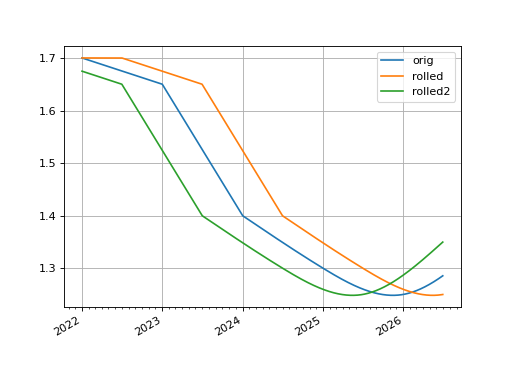
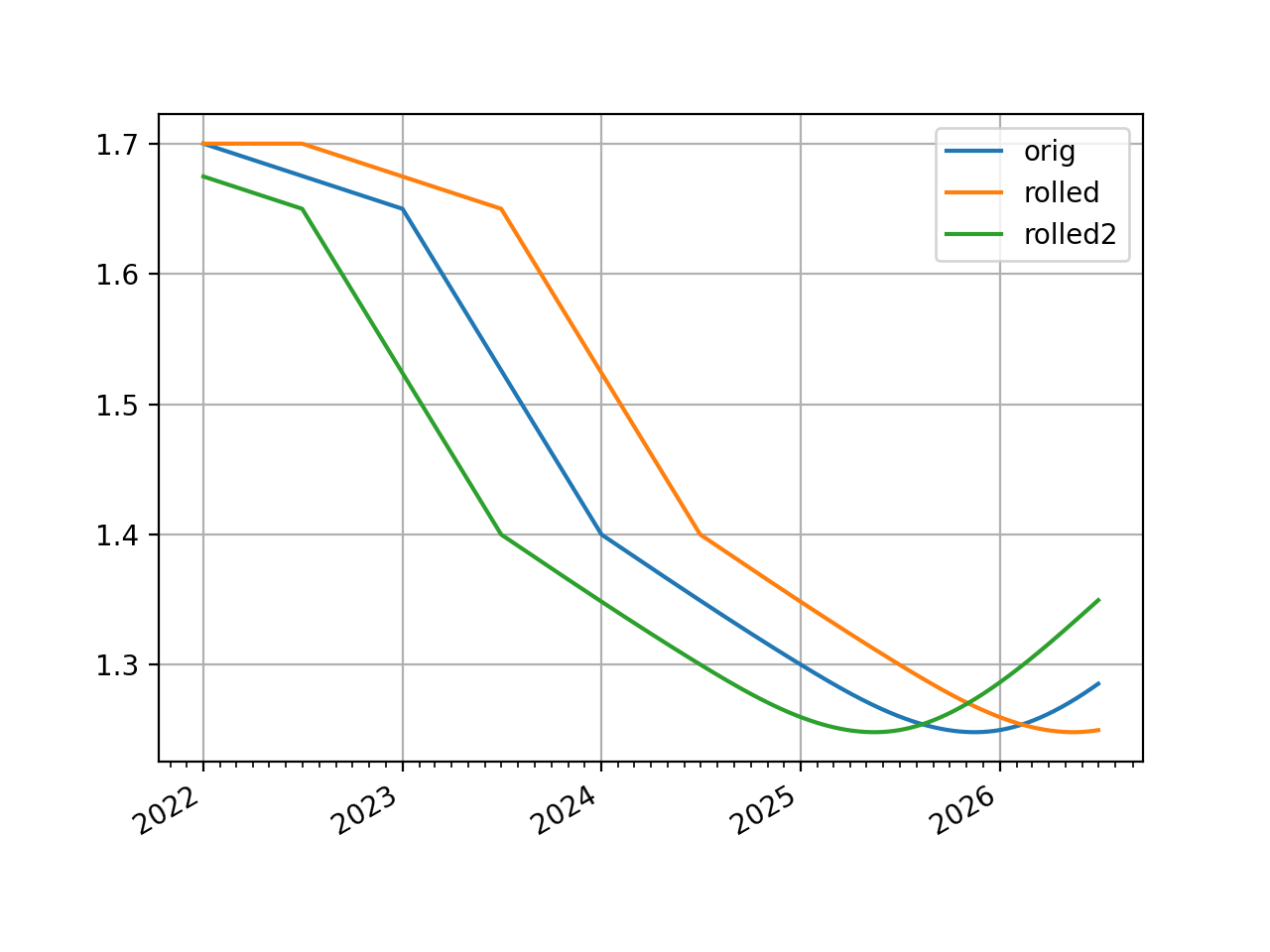
The basic use of this function translates a curve forward in time and the plot demonstrates its rates are exactly the same as initially forecast.
In [1]: line_curve = LineCurve(
   ...:     nodes = {
   ...:         dt(2022, 1, 1): 1.7,
   ...:         dt(2023, 1, 1): 1.65,
   ...:         dt(2024, 1, 1): 1.4,
   ...:         dt(2025, 1, 1): 1.3,
   ...:         dt(2026, 1, 1): 1.25,
   ...:         dt(2027, 1, 1): 1.35
   ...:     },
   ...:     t = [
   ...:         dt(2024, 1, 1), dt(2024, 1, 1), dt(2024, 1, 1), dt(2024, 1, 1),
   ...:         dt(2025, 1, 1),
   ...:         dt(2026, 1, 1),
   ...:         dt(2027, 1, 1), dt(2027, 1, 1), dt(2027, 1, 1), dt(2027, 1, 1),
   ...:     ],
   ...: )
   ...:

In [2]: rolled_curve = line_curve.roll("6m")

In [3]: rolled_curve2 = line_curve.roll("-6m")

In [4]: line_curve.plot(
   ...:     "1d",
   ...:     comparators=[rolled_curve, rolled_curve2],
   ...:     labels=["orig", "rolled", "rolled2"],
   ...:     right=dt(2026, 7, 1)
   ...: )
   ...:
Out[4]:
(<Figure size 640x480 with 1 Axes>,
 <Axes: >,
 [<matplotlib.lines.Line2D at 0x112523ed0>,
  <matplotlib.lines.Line2D at 0x112523d90>,
  <matplotlib.lines.Line2D at 0x112522e90>])
(
Source code,png,hires.png,pdf)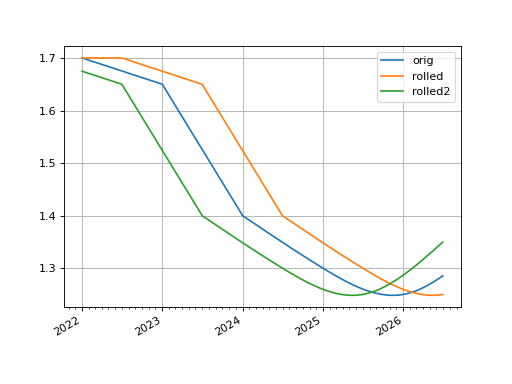
- shift(spread, id=NoInput.blank, composite=True, collateral=NoInput.blank)#
Raise or lower the curve in parallel by a set number of basis points.
- Parameters:
The number of basis points added to the existing curve.
Warning
If
compositeis True, users must be aware that adding Dual or Dual2 spreads must be compatible with the AD order of Self, otherwise TypeErrors may be raised. If in doubt, only use float spread values.id (str, optional) – Set the id of the returned curve.
composite (bool, optional) – If True will return a CompositeCurve that adds a flat curve to the existing curve. This results in slower calculations but the curve will maintain a dynamic association with the underlying curve and will change if the underlying curve changes.
collateral (str, optional) – Designate a collateral tag for the curve which is used by other methods.
- Return type:
Examples
In [1]: from rateslib.curves import LineCurve
In [2]: line_curve = LineCurve(
   ...:     nodes = {
   ...:         dt(2022, 1, 1): 1.7,
   ...:         dt(2023, 1, 1): 1.65,
   ...:         dt(2024, 1, 1): 1.4,
   ...:         dt(2025, 1, 1): 1.3,
   ...:         dt(2026, 1, 1): 1.25,
   ...:         dt(2027, 1, 1): 1.35
   ...:     },
   ...:     t = [
   ...:         dt(2024, 1, 1), dt(2024, 1, 1), dt(2024, 1, 1), dt(2024, 1, 1),
   ...:         dt(2025, 1, 1),
   ...:         dt(2026, 1, 1),
   ...:         dt(2027, 1, 1), dt(2027, 1, 1), dt(2027, 1, 1), dt(2027, 1, 1),
   ...:     ],
   ...: )
   ...:

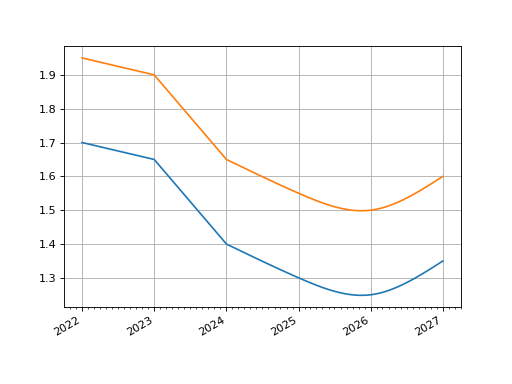
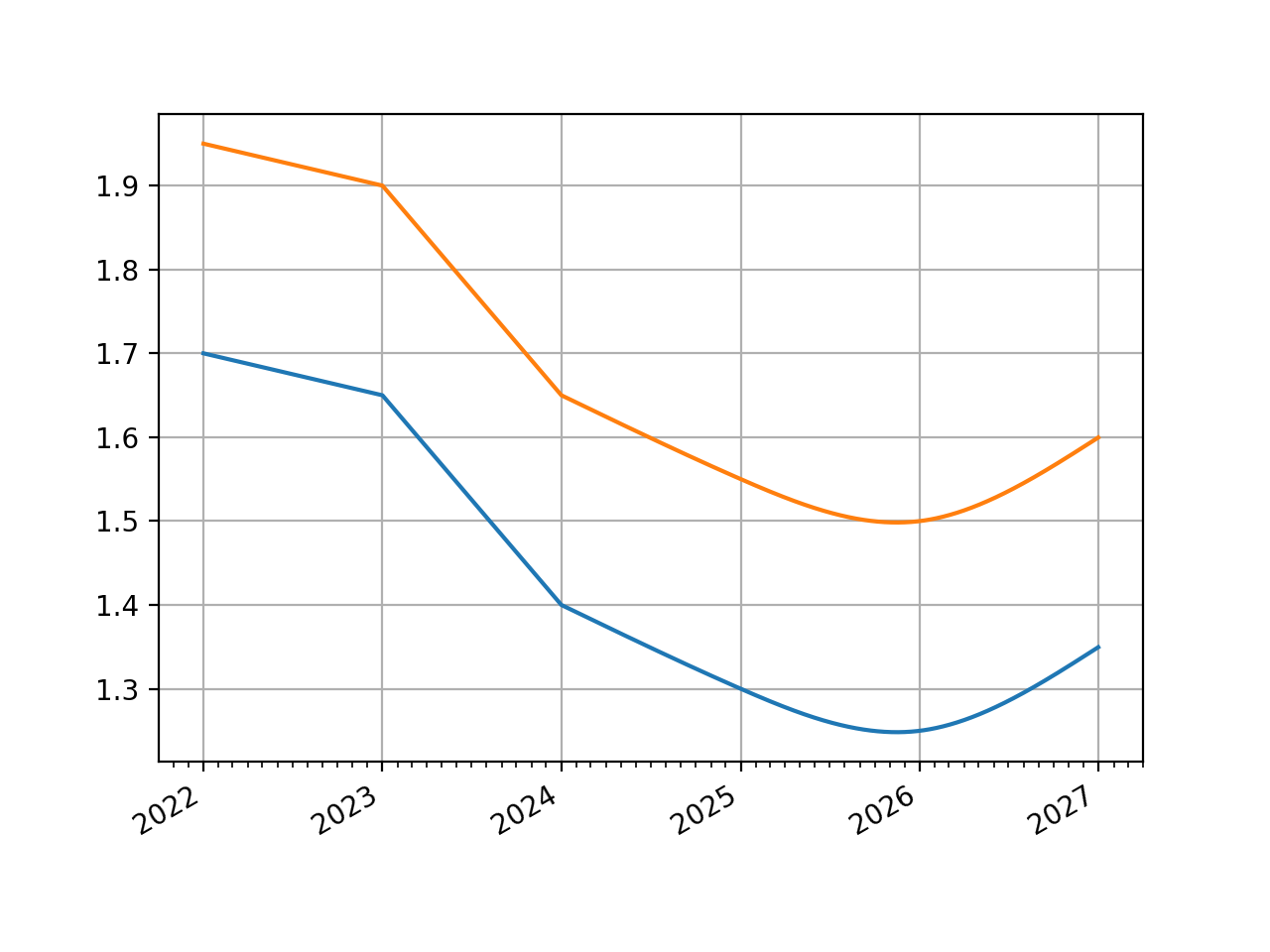
In [3]: spread_curve = line_curve.shift(25)

In [4]: line_curve.plot("1d", comparators=[spread_curve])
Out[4]:
(<Figure size 640x480 with 1 Axes>,
 <Axes: >,
 [<matplotlib.lines.Line2D at 0x1121b0910>,
  <matplotlib.lines.Line2D at 0x1121b0e10>])
(
Source code,png,hires.png,pdf)
- to_json()#
Convert the parameters of the curve to JSON format.
- Return type:
str
- translate(start, t=False)#
Create a new curve with an initial node date moved forward keeping all else constant.
This curve adjustment preserves forward curve expectations as time evolves. This method is suitable as a way to create a subsequent opening curve from a previous day’s closing curve.
- Parameters:
start (datetime) – The new initial node date for the curve, must be in the domain: (node_date[0], node_date[1]]
t (bool) – Set to True if the initial knots of the knot sequence should be translated forward.
- Return type:
Examples
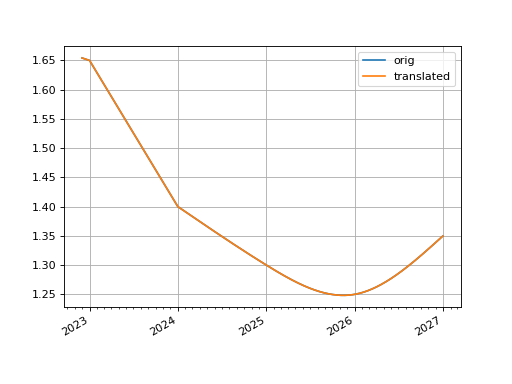
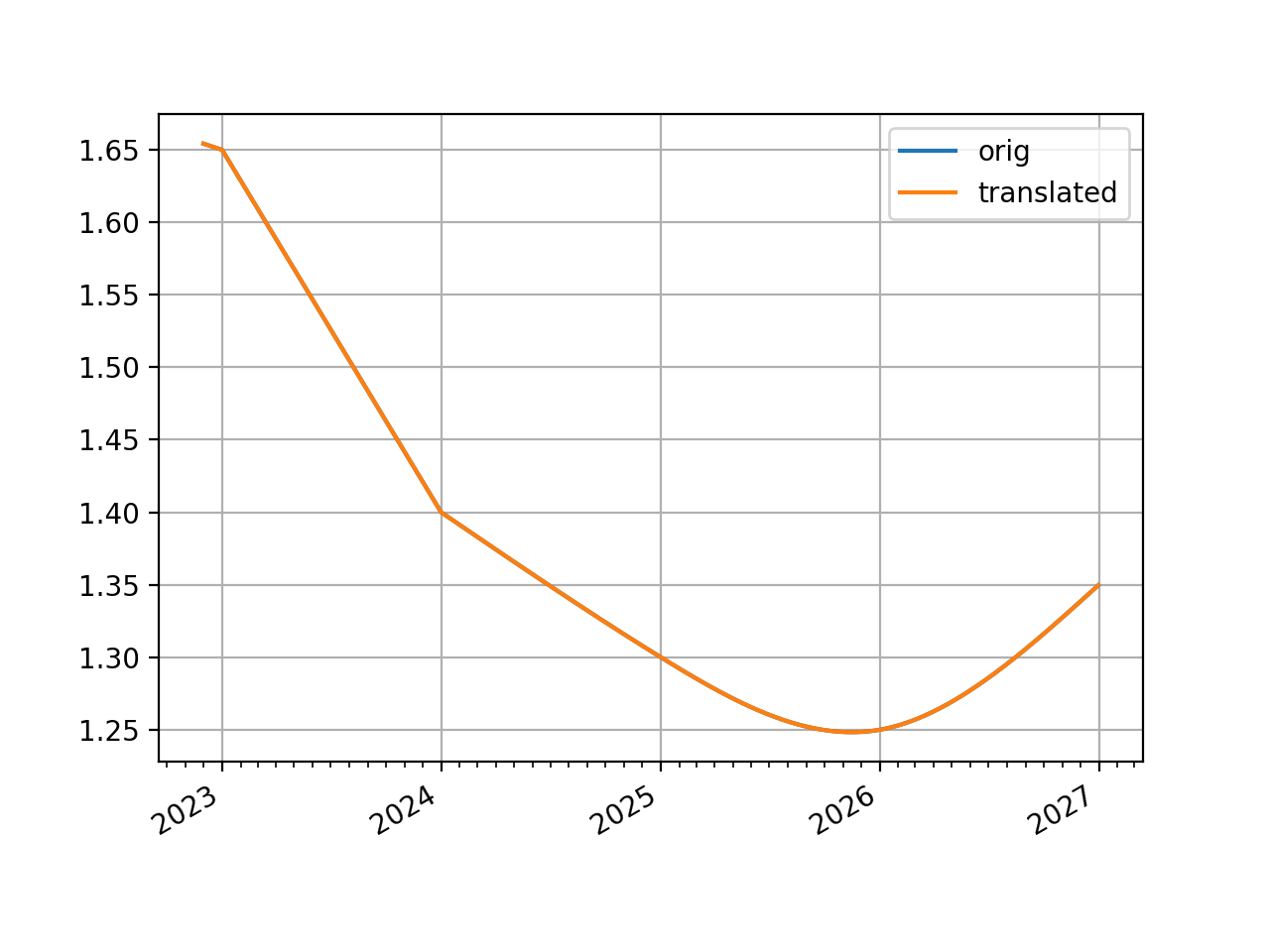
The basic use of this function translates a curve forward in time and the plot demonstrates its rates are exactly the same as initially forecast.
In [1]: line_curve = LineCurve(
   ...:     nodes = {
   ...:         dt(2022, 1, 1): 1.7,
   ...:         dt(2023, 1, 1): 1.65,
   ...:         dt(2024, 1, 1): 1.4,
   ...:         dt(2025, 1, 1): 1.3,
   ...:         dt(2026, 1, 1): 1.25,
   ...:         dt(2027, 1, 1): 1.35
   ...:     },
   ...:     t = [
   ...:         dt(2024, 1, 1), dt(2024, 1, 1), dt(2024, 1, 1), dt(2024, 1, 1),
   ...:         dt(2025, 1, 1),
   ...:         dt(2026, 1, 1),
   ...:         dt(2027, 1, 1), dt(2027, 1, 1), dt(2027, 1, 1), dt(2027, 1, 1),
   ...:     ],
   ...: )
   ...:

In [2]: translated_curve = line_curve.translate(dt(2022, 12, 1))

In [3]: line_curve.plot("1d", comparators=[translated_curve], left=dt(2022, 12, 1))
Out[3]:
(<Figure size 640x480 with 1 Axes>,
 <Axes: >,
 [<matplotlib.lines.Line2D at 0x1133ab890>,
  <matplotlib.lines.Line2D at 0x1133ab9d0>])
(
Source code,png,hires.png,pdf)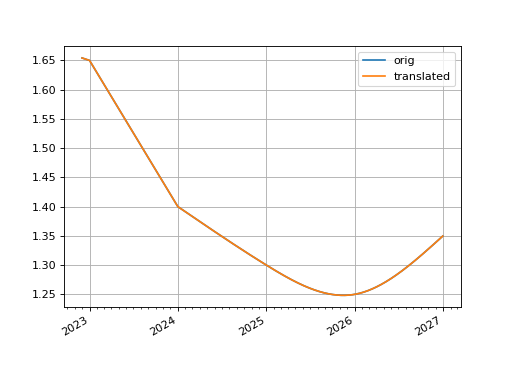
In [4]: line_curve.nodes
Out[4]:
{datetime.datetime(2022, 1, 1, 0, 0): 1.7,
 datetime.datetime(2023, 1, 1, 0, 0): 1.65,
 datetime.datetime(2024, 1, 1, 0, 0): 1.4,
 datetime.datetime(2025, 1, 1, 0, 0): 1.3,
 datetime.datetime(2026, 1, 1, 0, 0): 1.25,
 datetime.datetime(2027, 1, 1, 0, 0): 1.35}

In [5]: translated_curve.nodes
Out[5]:
{datetime.datetime(2022, 12, 1, 0, 0): 1.6542465753424658,
 datetime.datetime(2023, 1, 1, 0, 0): 1.65,
 datetime.datetime(2024, 1, 1, 0, 0): 1.4,
 datetime.datetime(2025, 1, 1, 0, 0): 1.3,
 datetime.datetime(2026, 1, 1, 0, 0): 1.25,
 datetime.datetime(2027, 1, 1, 0, 0): 1.35}
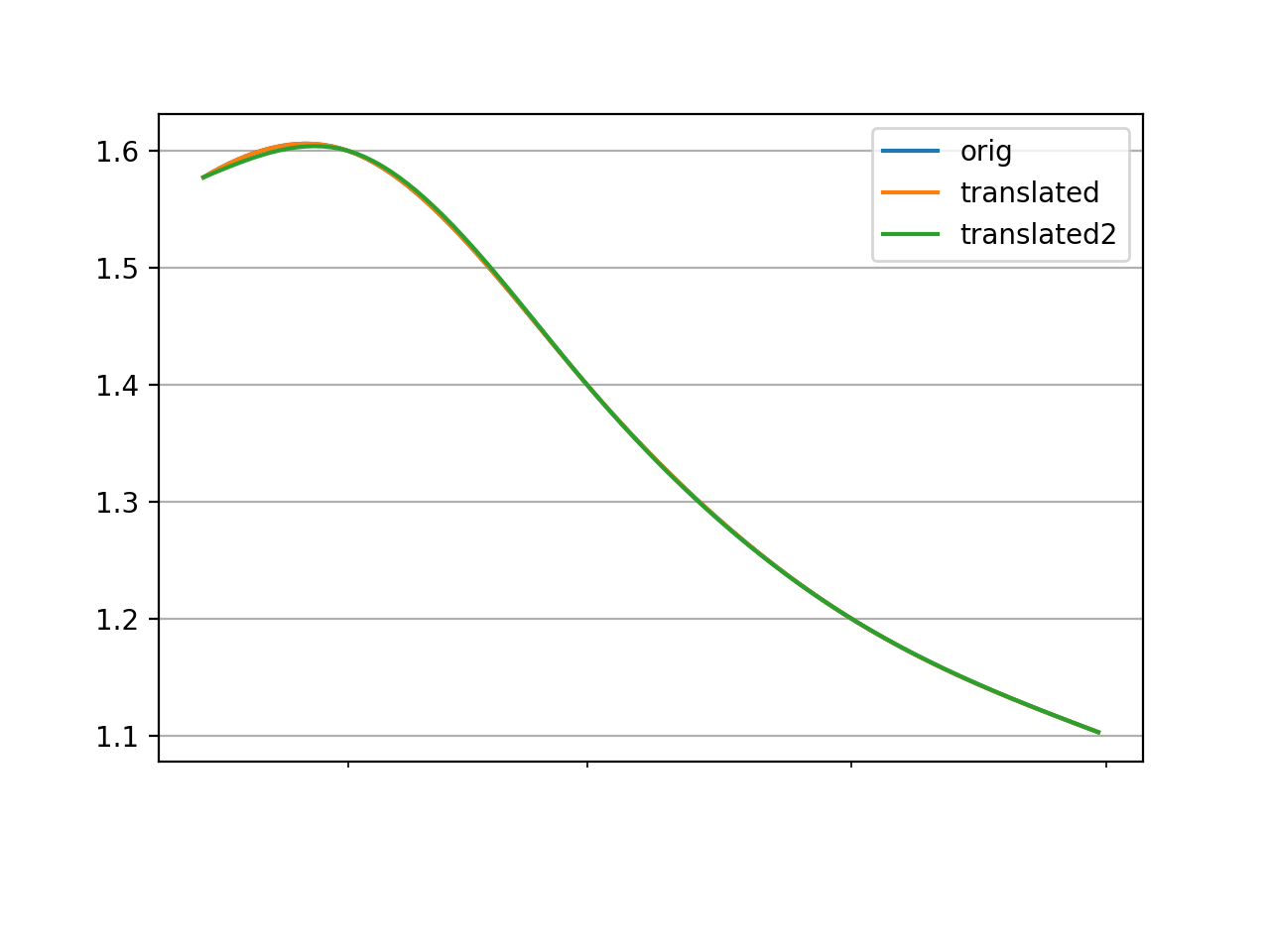
When a line curve has a cubic spline the knot dates can be preserved or translated with the
targument. Preserving the knot dates preserves the interpolation of the curve. A knot sequence for a mixed curve which begins afterstartwill not be affected in either case.In [6]: curve = LineCurve( ...: nodes={ ...: dt(2022, 1, 1): 1.5, ...: dt(2022, 2, 1): 1.6, ...: dt(2022, 3, 1): 1.4, ...: dt(2022, 4, 1): 1.2, ...: dt(2022, 5, 1): 1.1, ...: }, ...: t = [dt(2022, 1, 1), dt(2022, 1, 1), dt(2022, 1, 1), dt(2022, 1, 1), ...: dt(2022, 2, 1), dt(2022, 3, 1), dt(2022, 4, 1), ...: dt(2022, 5, 1), dt(2022, 5, 1), dt(2022, 5, 1), dt(2022, 5, 1)] ...: ) ...: In [7]: translated_curve = curve.translate(dt(2022, 1, 15)) In [8]: translated_curve2 = curve.translate(dt(2022, 1, 15), t=True) In [9]: curve.plot("1d", left=dt(2022, 1, 15), comparators=[translated_curve, translated_curve2], labels=["orig", "translated", "translated2"]) Out[9]: (<Figure size 640x480 with 1 Axes>, <Axes: >, [<matplotlib.lines.Line2D at 0x113176710>, <matplotlib.lines.Line2D at 0x113176850>, <matplotlib.lines.Line2D at 0x113176990>])
(
Source code,png,hires.png,pdf)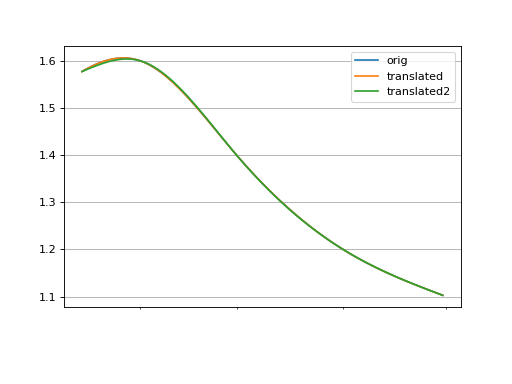
- update(nodes=NoInput.blank, interpolation=NoInput.blank, endpoints=NoInput.blank)#
Update a curve with new, manually input values.
For arguments see
Curve. Any value not given will not change the underlying Curve.- Parameters:
nodes (dict[datetime, DualTypes], optional) – New nodes to assign to the curve.
interpolation (str or Callable, optional) – Interpolation method to use.
endpoints (str or tuple[str, str], optional) – Endpoint constraints to apply to spline interpolation.
- Return type:
None
Notes
Warning
Rateslib is an object-oriented library that uses complex associations. Although Python may not object to directly mutating attributes of a Curve instance, this should be avoided in rateslib. Only use official
updatemethods to mutate the values of an existing Curve instance. This class is labelled as a mutable on update object.
- update_node(key, value)#
Update a single node value on the Curve.
- Parameters:
- Return type:
None
Notes
Warning
Rateslib is an object-oriented library that uses complex associations. Although Python may not object to directly mutating attributes of a Curve instance, this should be avoided in rateslib. Only use official
updatemethods to mutate the values of an existing Curve instance. This class is labelled as a mutable on update object.