
Dense Liquid Bond Curves (EUR, GBP, USD)#
This example will discuss curve building standards for liquid bond markets with many actively traded bonds as data points.
Key Points
Standard configuration for Curve setup.
Consideration for using academic, parameter based Curves.
Data
We have acquired a list of 69 UK gilt prices from a retail broker with their maturities. The accuracy of these prices may be dubious and we assume that all of them are currently settling within a regular coupon period (not a short or long stub). The data is displayed below:
In [1]: df
Out[1]:
     Maturity  Coupon  Clean Price
0  2026-01-30    0.12        99.90
1  2026-07-22    1.50        98.93
2  2026-10-22    0.38        97.77
3  2027-01-29    4.12       100.43
4  2027-03-07    3.75       100.08
..        ...     ...          ...
64 2063-10-22    4.00        81.51
65 2065-07-22    2.50        56.49
66 2068-07-22    3.50        73.00
67 2071-10-22    1.62        41.10
68 2073-10-22    1.12        32.46

[69 rows x 3 columns]
To this DataFrame we can add our Instrument object and some easy to calculate metrics:
In [2]: df["Bond"] = [
   ...:     FixedRateBond(
   ...:         effective=dt(2025, 1, 1),
   ...:         termination=t,
   ...:         spec="uk_gb",
   ...:         fixed_rate=c,
   ...:         curves="uk_gb_curve",
   ...:         metric="clean_price"
   ...:     ) for (t, c) in zip(df["Maturity"], df["Coupon"])
   ...: ]
   ...:

In [3]: df["Accrued"] = [b.accrued(settlement=dt(2026, 1, 19)) for b in df["Bond"]]

In [4]: df["YTM"] = [b.ytm(price=p, settlement=dt(2026, 1, 19)) for (b, p) in zip(df["Bond"], df["Clean Price"])]

In [5]: df["Risk"] = [b.duration(ytm=y, settlement=dt(2026, 1, 19)) for (b, y) in zip(df["Bond"], df["YTM"])]
In [6]: df
Out[6]:
     Maturity  Coupon  Clean Price                               Bond  Accrued  YTM  Risk
0  2026-01-30    0.12        99.90  <rl.FixedRateBond at 0x12dba6d50>     0.06 3.50  0.03
1  2026-07-22    1.50        98.93  <rl.FixedRateBond at 0x12dba69f0>    -0.01 3.64  0.49
2  2026-10-22    0.38        97.77  <rl.FixedRateBond at 0x12dba6330>     0.09 3.39  0.73
3  2027-01-29    4.12       100.43  <rl.FixedRateBond at 0x12dba61b0>     1.95 3.69  1.00
4  2027-03-07    3.75       100.08  <rl.FixedRateBond at 0x12dba5fd0>     1.39 3.67  1.10
..        ...     ...          ...                                ...      ...  ...   ...
64 2063-10-22    4.00        81.51  <rl.FixedRateBond at 0x12d9666f0>     0.98 5.11 14.23
65 2065-07-22    2.50        56.49  <rl.FixedRateBond at 0x12d9660f0>    -0.02 5.05 11.13
66 2068-07-22    3.50        73.00  <rl.FixedRateBond at 0x12d967050>    -0.03 5.05 13.61
67 2071-10-22    1.62        41.10  <rl.FixedRateBond at 0x12d965b50>     0.40 4.83  9.52
68 2073-10-22    1.12        32.46  <rl.FixedRateBond at 0x12d965910>     0.28 4.67  8.50

[69 rows x 7 columns]
Curves
We will build a Curve and, as comparison, an academic
NelsonSiegelCurve. The choice of the node dates
on the Curve are subjectively chosen suit the local market and available data.
In [7]: curve = Curve(
   ...:     id="uk_gb_curve",
   ...:     calendar="ldn",
   ...:     convention="act365f",
   ...:     interpolation="spline",
   ...:     nodes={
   ...:          dt(2026, 1, 16): 1.0,
   ...:          **{add_tenor(dt(2026, 1, 16), _, "None"): 1.0
   ...:             for _ in ["4m", "1y", "2y", "3y", "4y", "5y", "7y", "10y", "15y", "20y", "25y", "30y", "40y", "50y"]}
   ...:     }
   ...: )
   ...:

In [8]: ns = NelsonSiegelCurve(
   ...:     id="uk_gb_curve",
   ...:     calendar="ldn",
   ...:     convention="act365f",
   ...:     dates=(dt(2026, 1, 16), dt(2076, 1, 16)),
   ...:     parameters=[0.01, 0.01, 0.01, 0.5],
   ...: )
   ...:
Calibration and Solver
We will setup a solver factory in order to create an individual :class:~rateslib.solver.Solver` for each Curve passed as an argument - in order to eliminate repeated code. The convergence tolerances here are fairly loose to promote early stopping and avoid failed iterations.
In [9]: def solver_factory(c):
   ...:     return Solver(
   ...:         curves=[c],
   ...:         instruments=df["Bond"],
   ...:         s=df["Clean Price"],
   ...:         conv_tol=1e-5,
   ...:         ini_lambda = (10000, 0.5, 3)
   ...:     )
   ...:
In [10]: c_solver = solver_factory(curve)
SUCCESS: `conv_tol` reached after 7 iterations (levenberg_marquardt), `f_val`: 17.453656807813022, `time`: 0.1070s

In [11]: ns_solver = solver_factory(ns)
SUCCESS: `conv_tol` reached after 13 iterations (levenberg_marquardt), `f_val`: 63.557789371285125, `time`: 0.2247s
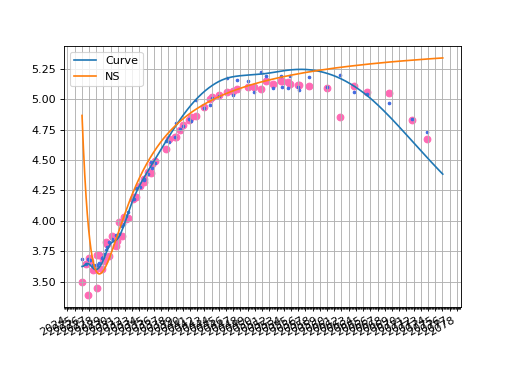
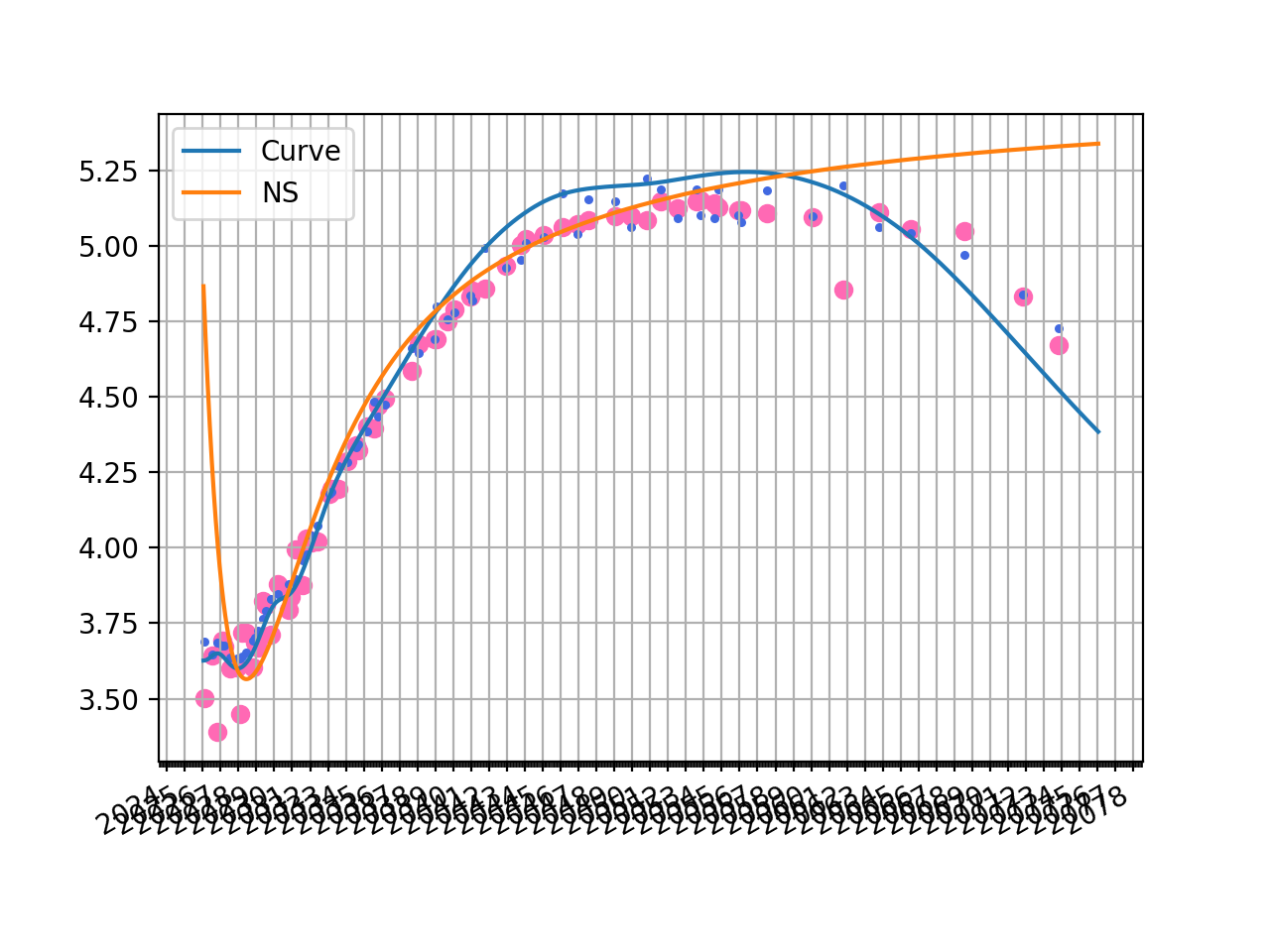
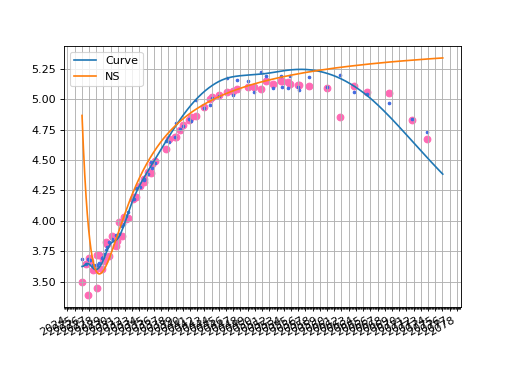
The plotted zero rate curve alongside scattered YTMs is visible below. Additionally, we show the corresponding YTMs for each bond calculated with the Curve in matching color.
fig, ax, lines = curve.plot("Z", comparators=[ns], labels=["Curve", "NS"])
ax.scatter(df["Maturity"], df["YTM"], color="hotpink")
ax.scatter(df["Maturity"], [b.rate(solver=c_solver, metric="ytm") for b in df["Bond"]], color="royalblue", s=5)
plt.show()
(Source code, png, hires.png, pdf)
The previous tab solved Curves to minimise the least squares difference of clean
prices. To solve instead relative to YTM (which is not an insignificant change) one can
either directly incorporate this into the Instrument metric at initialisation, or
manually overload it at a Solver level.
def solver_factory(c):
    return Solver(
        curves=[c],
        instruments=[(b, {"metric": "ytm"}) for b in df["Bond"]],
        s=df["YTM"]
    )
Alternatively, one might recognise that solving for YTM squared differences is
equivalent to solving price squared difference, where those prices have been scaled according
to the ‘duration risk’ (\(\frac{\partial P}{\partial y}\)). Therefore we can also
obtain a similar result use the weights.
def solver_factory(c):
    return Solver(
        curves=[c],
        instruments=df["Bond"],
        s=df["Clean Price"],
        weights=[1/r**2 for r in df["Risk"]]
    )
For a little more reading on this topic consider this link.
The solver weights might also have a secondary purpose of phasing in or out specific
bonds which have unconventional characteristics, such as recently issued or very low
free float volume, clauses which do not align with bonds in the rest of the series (CAC vs non-CAC),
bonds speacial in the repo market, etc. etc.